ClonePrompt: Transform Any Image Into an AI Prompt
Introducing ClonePrompt, a free tool that uses Google Gemini to analyze images and generate detailed prompts for FLUX, Midjourney, GPT Image, and more.
Have you ever seen an AI-generated image and wondered: "How do I create something like that?" The challenge of reverse-engineering a visual into words is one of the most common frustrations in the AI art community. That's exactly the problem ClonePrompt was built to solve.
The Problem with Prompt Engineering
Writing effective prompts is an art in itself. You need to describe:
- Composition — How elements are arranged in the frame
- Lighting — The quality, direction, and mood of light
- Style — Artistic influences, medium, and aesthetic
- Technical details — Camera settings, aspect ratio, rendering quality
Getting all of these right, especially when trying to recreate a specific look, can be incredibly time-consuming.
The gap between what we see and what we can describe is where creativity gets lost.
How ClonePrompt Works
ClonePrompt takes a simple three-step approach:
1. Upload Your Image
Drag and drop any image (JPG, PNG, or WebP up to 10MB) into the interface. This could be:
- An AI-generated image you want to recreate
- A photograph whose style you want to capture
- Artwork that inspires you
2. AI Analysis
The tool uses Google Gemini to perform a comprehensive visual analysis. It examines every aspect of the image: subject matter, artistic style, color palette, lighting conditions, composition, mood, and technical qualities.
3. Get Your Prompt
Within seconds, you receive a detailed, optimized prompt ready to use with your favorite AI image generator.
Supported AI Models
The generated prompts are designed to work across the major platforms:
- FLUX 2 — For high-quality, photorealistic results
- GPT Image — OpenAI's image generation
- Midjourney V7 — The latest version of the popular tool
- Seedream 4.5 — Advanced image synthesis
- Ideogram — Great for text in images
- Recraft — Professional design-focused generation
- WAN 2.6 — Video generation capabilities
- Nano Banana Pro — Specialized generation
A Practical Example
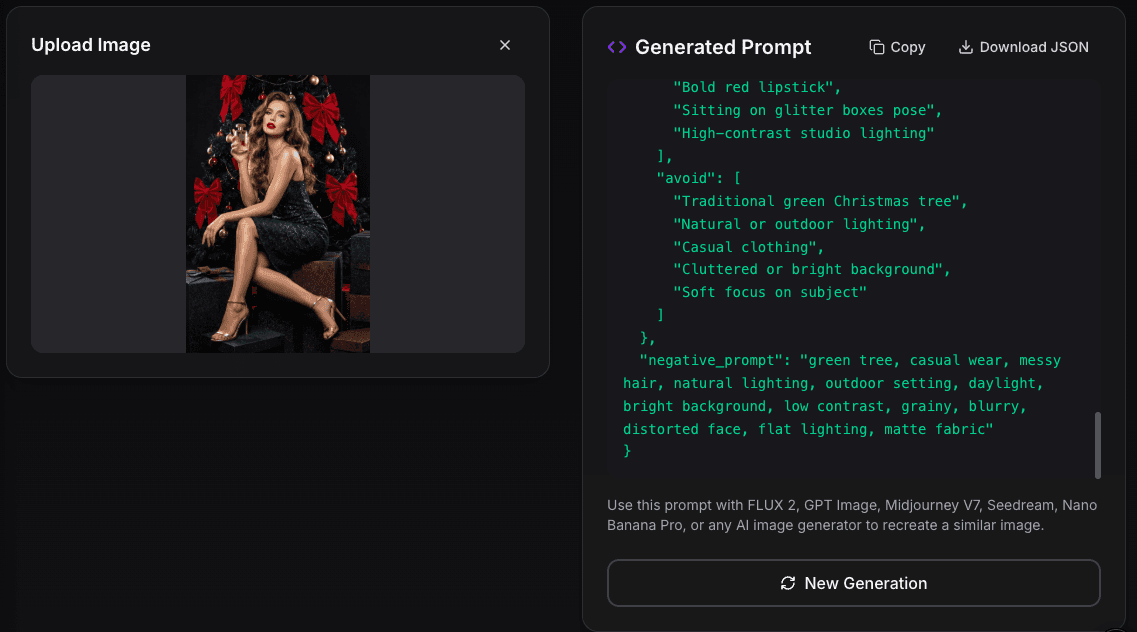
Take the cover image of this post — a glamorous fashion photo with a model in sequins against a black Christmas tree. Upload it to ClonePrompt and you get a structured JSON breakdown like this:
1{2"camera": {3 "lens": "85mm prime lens for flattering compression",4 "angle": "Eye-level, full-body shot",5 "depth_of_field": "Deep enough to keep subject sharp, slight falloff on branches"6},7"subject": {8 "pose": "Seated on glittery gift boxes, legs crossed, holding a perfume bottle",9 "makeup": {10 "eyes": "Sophisticated smokey eye with defined lashes",11 "lips": "Bold matte classic red (#BD0000)",12 "skin": "Flawless, radiant finish with subtle contouring"13 },14 "clothing": {15 "dress": "Dark teal sequined mini dress with thin straps",16 "shoes": "Metallic gold stiletto sandals"17 }18},19"lighting": {20 "style": "High-end commercial studio lighting",21 "key_light": "Soft, large source from camera-left",22 "rim_light": "Sharp hair and shoulder lighting"23},24"environment": {25 "setting": "Luxurious holiday-themed studio set",26 "background": "Midnight black Christmas tree with red velvet bows"27},28"constraints": {29 "avoid": ["Green tree", "Natural lighting", "Casual clothing"],30 "must_keep": ["Sequined dress texture", "Bold red lipstick", "High-contrast lighting"]31}32}The AI captures camera settings, subject details down to hex color codes, lighting setup, and even suggests what to avoid. This level of analysis would take a professional photographer's eye and 20+ minutes to write manually.
Free to Use
ClonePrompt offers generous free usage:
- 5 generations per day without signing in
- 20 generations per day with a free Google login
There's also a community gallery where you can explore prompts generated by other users — great for inspiration and learning.
Why I Built This
As someone who spends a lot of time experimenting with AI image generation, I found myself constantly struggling with the prompt-writing process. The mental translation from "I like how this looks" to "here are the 15 specific details that make it look that way" was a bottleneck in my creative workflow.
ClonePrompt is my attempt to lower that barrier. Whether you're a seasoned AI artist looking to speed up your workflow or a beginner trying to understand what makes certain prompts work, this tool is designed to help.
Try It Out
Visit clone-prompt.federicopasinetti.it and give it a try. Upload an image that inspires you and see what prompts the AI generates. You might be surprised by the details it catches that you might have missed.
ClonePrompt is free and available in both English and Italian. Feedback and suggestions are always welcome!